Case study
RTX Raytracing
RTX Unreal Tests
I downloaded the Nvidia build of Unreal and tested out some of their unique features and posted about it on LinkedIn, this was the 1st post I made about it:
Nvidia maintains a custom build of Unreal that leverages the power of their graphics cards. This requires some changes to the code that makes up Unreal; it’s not something that can be done with just a plugin.
You can download this for free off of Github. You do have to compile it, which sounds intimidating but it’s not hard to do. Nvidia has released a tutorial on how to do it. Depending on your internet and computer speed, it takes about an hour to get it up and running.
It has several unique features, but the biggest one might be RTXDI. This allows you to have many lights in your scene with Raytraced shadows without a large performance hit.
When I turned on RTXDI, this scene went from about 50 frames per second to 80 fps, and the raytraced shadows looked nicer.
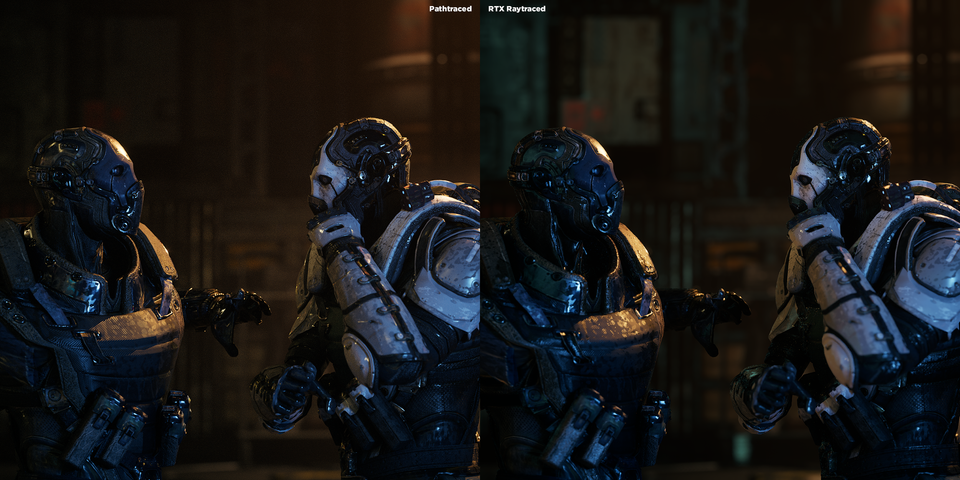
Seeing this, I wanted to do a comparison with RTXDI and Unreal’s Pathtracing. This scene is the Cyberpunk Rooftop Environment by Leartes Studios (currently 70% off during the Christmas Marketplace Sale). The characters are taken from a free project Epic released for Matinee (the precursor to Sequencer) which to me really hold up great. I really like the look of them, and I think their designs really hold up with the new lighting setup.
It’s interesting to look at the differences between Pathtracing and Raytracing. The biggest differences I noticed were:
✅ Pathtraced reflections were more realistic. I tried but I couldn’t get many of the reflections to show up, it didn’t matter if it was Lumen reflections or raytraced ones.
✅ Many more bounces of light made the scene a lot brighter.
✅ Fog and atmospherics were very different
✅ Some emissive materials (mostly store signs) just didn’t show up in the Pathtracer.
✅ Most puzzling of all, it looked like there was a white ground plane that would just show up in the Pathtracer. I’m sure there’s some setting to turn that off, but a quick look around the scene and settings didn’t turn up anything obvious.
It was a very fun test. I did one render (not shown) at very low quality just to make sure my render was set up correctly, which took about two minutes to render out. The high quality raytraced shot took an hour and 42 minutes to render out (16 Spatial and 16 Temporal Samples). The Pathtraced shot took 5 hours to render.

After that first post, I took another crack at it:
Lighting in Unreal is amazing. It also makes you want to bash your head against the monitor.
Just before the holidays I did a quick test of Nvidia’s build of Unreal that uses a lot of their custom hardware acceleration for rendering.
That all went fine, but when I wanted to compare it to the Pathtraced results, a mysterious white plane appeared, blocking anything that went below the ground plane.
I pushed it out on LinkedIn anyways since I thought the RTX stuff was interesting. But in the comments of my post I got some really helpful comments from Scott Rafferty and Manuel Hartinger.
Scott realized that I had ‘Reference Atmosphere’ turned on in my Pathtracer settings. This plane appears when that is turned on.
Manuel let me know that you can transform the atmosphere lower, so that this plane can be hidden. Thank you both for sharing what you know, it was very helpful.
This is one of the amazing and frustrating things about Unreal.
There are many optimizations and clever cheats that allow you get get 80% of the quality with a fraction of the rendering time.
But wow, there are so many little details and obscure settings that can drive you crazy.
I guess I’m just used to the VFX way of setting up your lights and letting the render engine crank through everything with brute force.
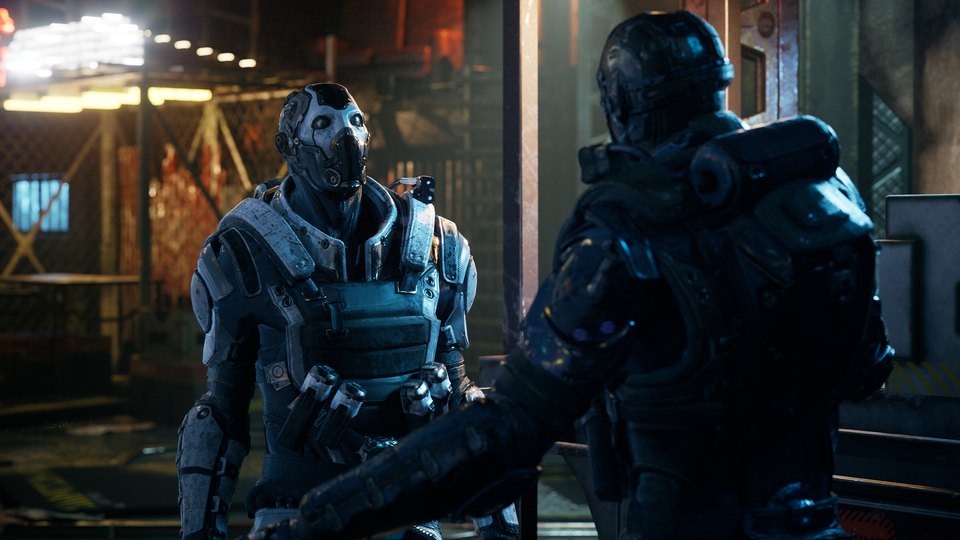
The attached video shows the technique of hiding that plane. Then there is a comparison between RTX Raytracing and Unreal's Pathtracer.
The RTX Raytracing version took about 8 minutes to render (1 Spatial Sample, 16 Temporal). Reflections are noisy and not as accurate as the Pathtracer, but I’m pretty blown away by the quality vs the render time.
The Pathtraced version has 128 Spatial Samples with 16 Temporal, with brightness clamped at 5 to reduce fireflies. That version took about 4.5 hours.
The big difference is in the atmospherics and reflections. Pathtracing also gives you some nicer shadows and bounce light, but it’s pretty subtle.
Happy New Year to everyone, I hope 2024 brings some welcome stability after a challenging 2023.